

A culture record becomes more useful when somebody else can understand it. Your colleague needs tomorrow’s feeding plan. Your supervisor wants a readable account of a completed batch. A collaborator needs structured values for analysis. Each reader is asking for a different view of the same work, and each benefits from a format suited to that task.
CellHood brings those views together through reports and exports. You can produce formatted PDFs, editable Word documents, spreadsheet-compatible CSV files and structured JSON, with ICS available for feeding schedules. The available formats depend on the report you choose. This guide explains what each output is for, how the report types differ, and how to turn your recorded culture work into something another person can review.
Start with the question your report should answer
Before downloading anything, decide what the recipient needs to know. “What happened to this culture?” calls for a batch record. “What should we prepare today?” calls for a feeding report. “Which stages does this method contain?” calls for a protocol export. Giving each question its own report keeps the useful information together and avoids sending an entire workspace when a focused document would do.
CellHood’s export chooser groups feeding reports alongside workspace reports. Feeding options cover today, the current week and a custom date range. Other choices include cell culture protocols, media formulations, culture records, audit reports and calendars. Choose the report first, then its available scope and format. Some outputs deliberately have fewer format choices because their purpose is different.
PDF for a clear, shareable record
PDF is the natural choice when the document’s layout matters. It gives the recipient a stable page structure, with headings, tables and contextual information arranged for reading or printing. A supervisor can review a culture history without opening the application, while a researcher preparing work at the bench can use a printed feeding sheet.
A batch report brings together the recorded identity and history of a culture. Depending on the record, that can include protocol context, dates, outcomes, feeding history, material lots and samples. Missing values remain distinguishable from recorded measurements. Generating a report does not fill gaps in the underlying record, so it remains important to review the source information before sharing it.
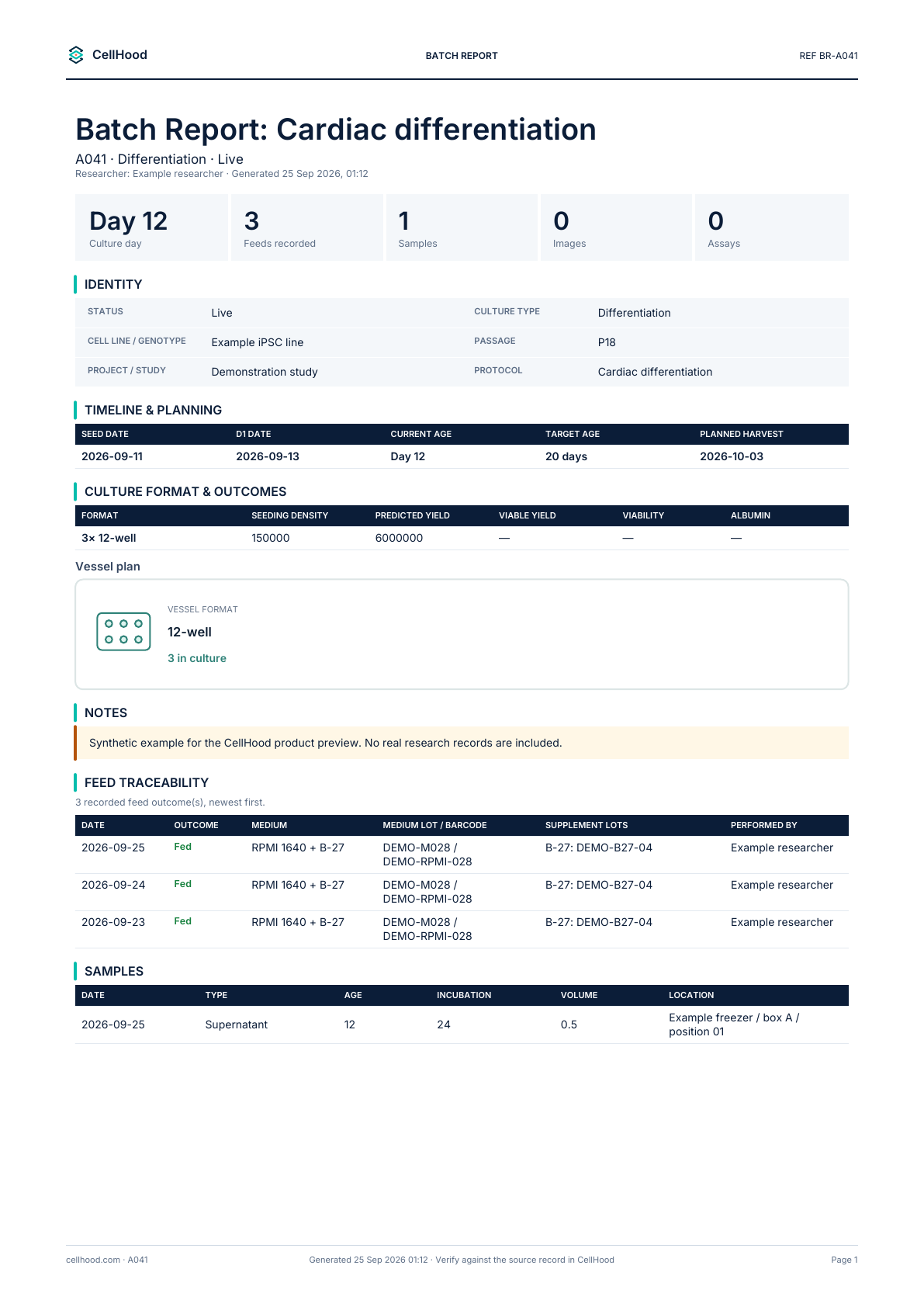
Example batch report using synthetic demonstration data. No real research records are shown.
Open the example batch report PDF.
The example shows how several parts of a culture’s history can sit on one readable page. A recipient can connect the culture identity with the recorded feed outcomes and collected samples, instead of reconstructing those relationships from separate messages. Keep the exported document with the project materials it supports, and retain the CellHood record as the place to inspect the underlying history.
Word for an editable working document
Choose DOCX when the next step involves writing, commenting or adapting a document. Word exports are available for feeding reports, cell culture protocols and media formulations. They provide editable content and tables that can become part of a handover, an internal methods document or a preparation pack for a collaborator.
For example, a protocol export can provide the recorded stages and related details, while your team adds project context in Word. A formulation export can support a preparation document that needs an additional local instruction. This avoids rebuilding the whole document from a blank page while still leaving room for the explanation that belongs to that particular audience.
Treat an edited Word file as a separate working copy. Changes made in Word do not automatically update the CellHood source record. If the team agrees to change the actual protocol or formulation, record that change in the application as well. This keeps the exported document’s role clear and reduces the risk of two different versions circulating without explanation.
Feeding reports turn schedules into preparation information
A feeding report connects scheduled cultures with the media needed to support them. The report can show formulations, component amounts, preparation volumes and the cultures covered by the selected period. Where applicable, preparation overage is included, so the document can support practical planning rather than simply listing tasks.
Today’s report is useful for a morning preparation check. A weekly report gives a broader view of the work ahead, while a custom range lets you focus on a particular period, up to thirty-one consecutive days. Researcher selection helps keep the document relevant to the people carrying out that work, within the scope available to your account.
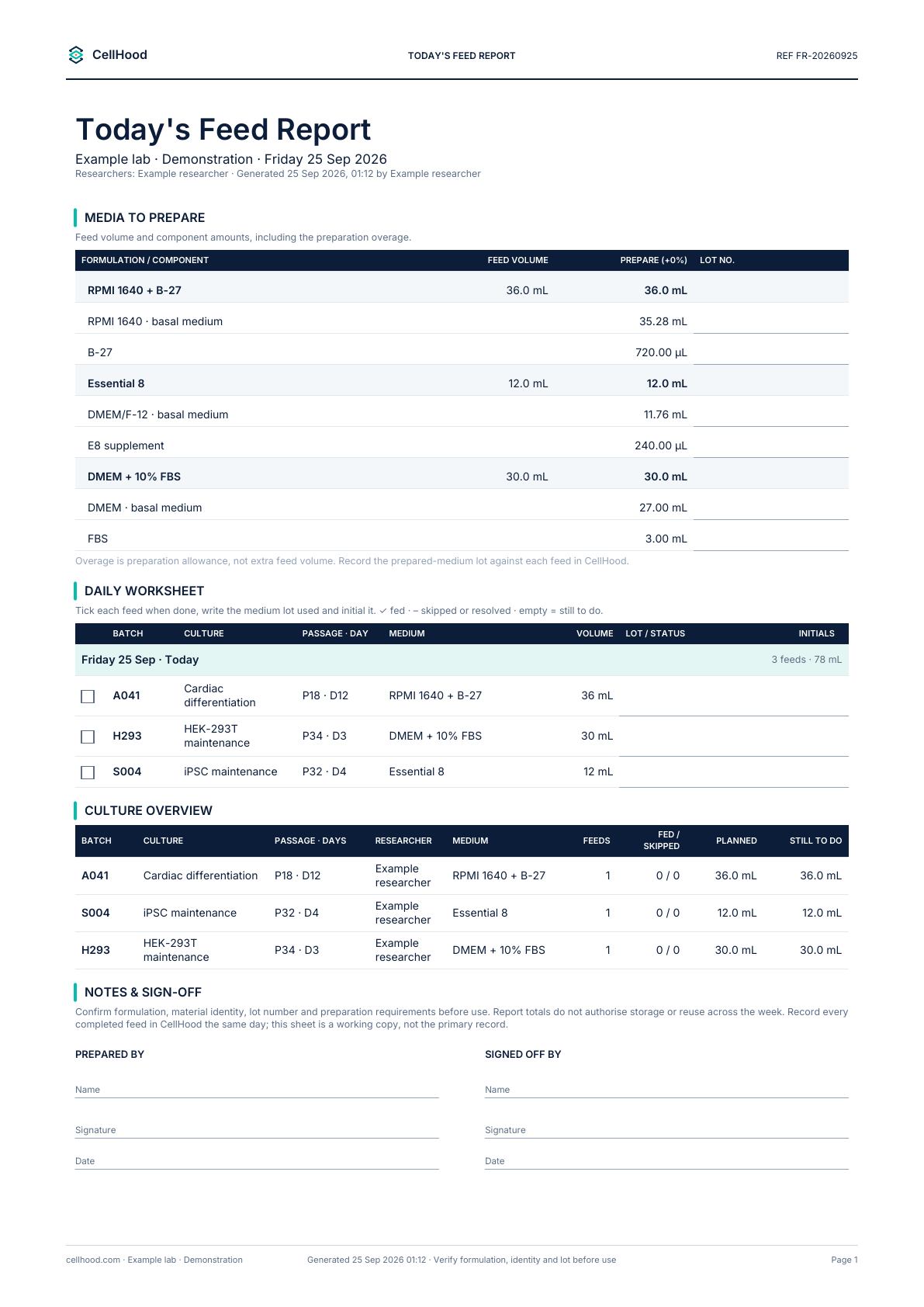
Example feeding report using synthetic demonstration data, including media components and preparation quantities.
Open the example feeding report PDF.
Before using a preparation sheet, check the selected dates, cultures, researcher scope and units. A report describes the information available when it was generated; it does not continuously refresh after download. If the schedule changes or another culture is added, generate a fresh report so that the document matches the work you intend to do.
CSV for spreadsheet review and analysis
CSV gives you a practical way to move tabular information into Excel, another spreadsheet application or an analysis workflow. It is useful when you want to sort rows, compare values, calculate summaries or bring exported information alongside other project data. It contains data rather than the visual layout of a PDF.
CellHood supports CSV for feeding reports, protocols and media formulations, as well as culture record exports. Report CSV files can contain several labelled table sections, separated by blank rows. That layout is convenient for human inspection, but an analysis script should recognise the sections rather than assume that every line belongs to one rectangular table.
Check dates, identifiers and units after opening a CSV in a spreadsheet. Spreadsheet applications can interpret values automatically, particularly dates and identifier strings. Preserve an untouched copy of the downloaded file before making transformations. If you need to explain a calculation later, keeping the original export alongside your analysis makes the sequence easier to follow.
JSON for structured, repeatable processing
JSON is useful when another program needs to read a report. For feeding, protocol and formulation exports, CellHood includes report metadata alongside named tables and their rows. The structure can carry the report type, title, workspace, generating user and generation time, giving a script more context than a set of values alone.
This format suits workflows where you want to repeat the same processing steps across exports. A script can select a named table, inspect its columns and extract the relevant rows without depending on page positions. Keep explicit checks for missing values and expected fields, and record the export date with any derived analysis.
JSON is an export format, not an automatic connection between applications. Downloading a file does not create a live synchronisation, schedule a recurring transfer or write changes back into CellHood. Those distinctions matter when deciding whether you need a one-off dataset, a repeatable manual workflow or a separately configured integration.
Match the format to the report
The export options are intentionally specific. Feeding reports, cell culture protocols and media formulations offer PDF, DOCX, CSV and JSON. Workspace culture records offer PDF and CSV. Individual batch reports provide formatted PDF records, while the formal audit report is issued as a protected PDF. These outputs serve related but different purposes.
For calendars, CellHood produces ICS files that can be imported into calendar applications. The chooser includes Google Calendar and an Outlook option that also supports Apple-compatible ICS. Select the date range, researcher scope and matching culture batches before downloading. This is a schedule export, rather than a replacement for a report documenting completed work.
A CSV can be opened in Excel, but it is not a native XLSX workbook. Likewise, an ICS import is not a live calendar subscription. Choosing the format by its actual behaviour helps the recipient understand what they are receiving and what they will need to do when the source information changes.
Keep review and traceability connected
A useful report makes its context understandable: what it covers, when it was generated and which records support it. When sending an export, add a short explanation of the question it answers. “Feeding requirements for the weekend team” is more informative than “latest report”, particularly when several files exist for the same project.
Review the document before distributing it. Confirm the selected scope, inspect blank fields and check that any units or recorded outcomes mean what the recipient expects. Do not turn an unrecorded value into a negative result or treat a scheduled action as evidence that it happened. The report should preserve the distinction between planned work and recorded history.
The audit PDF has a different role from an editable document. It is intended as a formal, modification-protected output, while a DOCX is intended for editing. A report format alone does not establish regulatory compliance, approve an experiment or replace your organisation’s review process. Use the appropriate review and sign-off arrangements for the work being documented.
For a straightforward handover, consider sending two complementary outputs. Use the PDF to explain the work in a readable form, and include CSV or JSON when the recipient needs to inspect the supporting tables. Give the files a clear project label and identify the period they cover. If you also send an edited Word document, say which additions are your commentary. This simple distinction helps colleagues separate exported records from later interpretation. It also makes follow-up questions more precise: they can refer to a particular culture, date or table instead of asking which attachment contains the information they need.
Include the generation date in your accompanying message.
Build reporting into the working day
Reporting becomes easier when the underlying records are maintained as the work happens. Record feeding outcomes, keep culture identities consistent and link the materials and samples that matter to your project. The next report can then draw on an organised history instead of becoming a separate exercise in reconstructing what happened.
Start with one recurring need: a daily feeding sheet, a protocol document for a colleague or a batch record for review. Choose the relevant report, set its scope, download the appropriate format and inspect the result. CellHood’s reporting tools give your culture work a route into documents, spreadsheets, structured datasets and calendars, while keeping the original records available for the next question.
Make reporting part of your culture workflow
Explore CellHood plans and start a trial to organise your culture records and prepare reports for your team.